
TL;DR:
- Israeli digital court filing allows remote submission of legal documents without visiting a courthouse. The process requires PDFs under 30MB, continuous pagination, and typed signer names, with affidavits needing physical signatures. International clients can have their attorneys file electronically, ensuring compliance and efficiency in Israeli legal proceedings.
Israeli digital court filing is the official electronic process for submitting legal documents to Israeli courts through a government platform called Net HaMishpat. This system replaces physical paper submissions with online uploads, making it possible to file pleadings, evidence, and motions without visiting a courthouse in person. For individuals and businesses operating from abroad, the Israeli court digital filing process is a practical way to participate in legal proceedings without international travel. Understanding the technical rules, authentication requirements, and document preparation standards is what separates a successful filing from a rejected one. This guide covers everything you need to know.
What is Israeli digital court filing and how does it work?
Net HaMishpat is Israel’s official digital court filing platform, enabling paperless submission of pleadings and evidence to Israeli courts. The Israeli Ministry of Justice oversees the system, and all registered Israeli courts participate in it. Clients and attorneys submit documents through a secure online portal, authenticated by Israel’s National Authentication System or TemoZ electronic identity certificates.
The system covers most court tiers, including the Magistrate Court, District Court, and Supreme Court. Each court tier has its own procedural rules, but the technical submission standards apply across the board. Understanding court filings in Israel starts with recognizing that Net HaMishpat is not optional for most proceedings. It is the required channel for electronic submissions.
For international clients, this matters enormously. You do not need to be physically present in Israel to file a document. Your Israeli attorney can submit on your behalf, fully authenticated, from anywhere in the world. That capability is the foundation of remote legal representation under Israeli law.
What technical and legal requirements must be met for digital court filings in Israel?
The Israeli court digital filing process has strict technical rules. Meeting them before you upload saves time and prevents rejection.
File format and size
- PDF format is mandatory for all electronic court documents, as required by Section 2(2) of the electronic document submission rules. No Word files, image files, or other formats are accepted.
- Each uploaded file must not exceed 30MB. Files larger than 30MB must be split into sequentially labeled volumes or compressed before upload.
- All pages, including annexes, must be numbered consecutively throughout the entire document. This continuous pagination helps judges and clerks locate specific pages quickly.
- When a filing includes more than five annexes, a table of contents and cover page for each annex are required. This rule applies regardless of the total document length.
Signature rules
Since september 6, 2022, Israeli court filings no longer require a smart card digital signature. Under Section 2(4) of the electronic submission rules, a document is considered signed when the signer’s name appears at the end of the document. This change removed a significant technical barrier for attorneys filing remotely.
There is one important exception. Affidavits still require a physical signature alongside the electronic submission. The Electronic Signature Law of 2001 governs digital signature validity in Israel, and certain court filings retain specialized requirements that go beyond the standard naming rule.
Authentication
Identity verification during submission uses either Israel’s National Authentication System or TemoZ electronic identity certificates. Both methods are legally recognized for court portal access. Your attorney handles this step during the upload process.
Pro Tip: Before uploading, open your PDF and confirm three things: the file is under 30MB, every page carries a consecutive number, and the signer’s name appears at the document’s end. These three checks eliminate the most common rejection reasons.
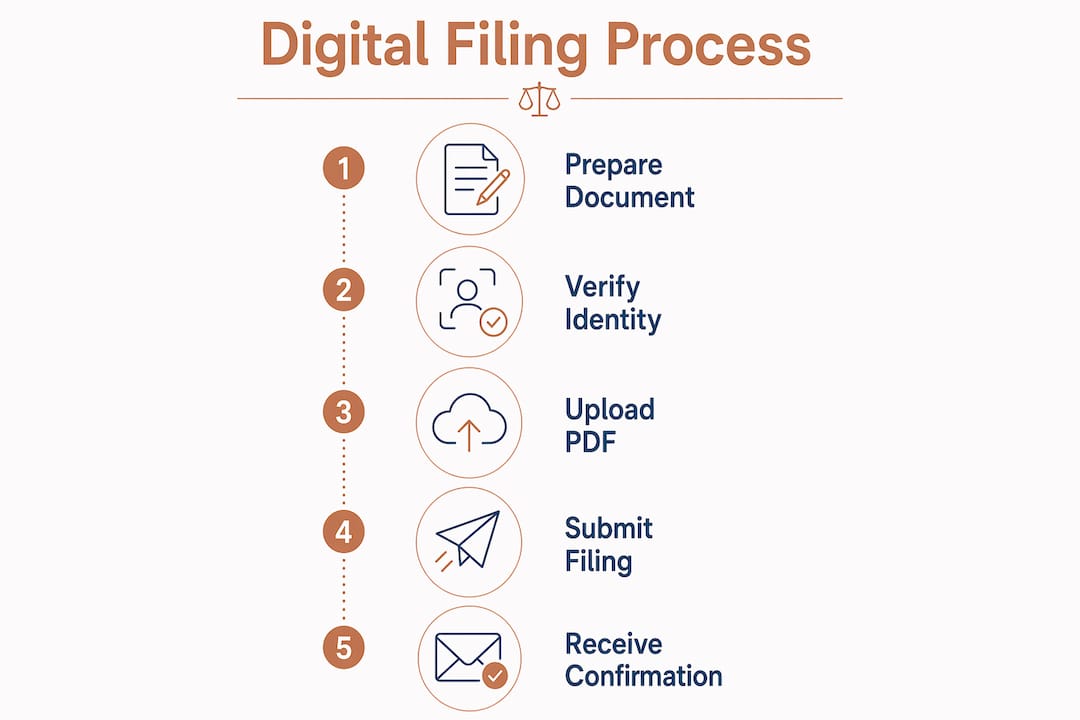
How to prepare your documents and upload them using the Israeli court digital filing system
Proper document preparation is where most filing errors happen. The steps below reflect the requirements of the Net HaMishpat platform and the Israeli court submission rules.
Convert all documents to PDF. Word files, scanned images, and spreadsheets must all be converted to PDF before submission. Use a reliable PDF conversion tool to preserve formatting. Do not submit native Word or image files under any circumstances.
Apply OCR to all scanned pages. Scanned annexes must be OCR-processed to make them text-searchable. Courts require searchable documents, and unprocessed scans risk rejection. OCR also makes it easier for judges and opposing counsel to reference specific passages.
Number all pages consecutively. Start from page 1 and number through to the last page of the last annex. Do not restart numbering at each annex. Continuous pagination is a firm requirement under the filing rules.
Organize annexes correctly. Label each annex clearly. If you have more than five annexes, add a table of contents at the front of the annex bundle and a cover page before each individual annex. For large exhibit bundles, split files into labeled volumes such as “Annex A Part 1” and “Annex A Part 2.”
Check and reduce file size. If your PDF exceeds 30MB, compress it using a PDF compression tool. If compression alone does not bring it under the limit, split the document into separate volumes. Label each volume sequentially so the court can reassemble them in order.
Prepare the signature block. Under the current rules, type the signer’s full name at the end of the document. No smart card or digital certificate is needed for standard filings. For affidavits, arrange a physical signature before scanning and converting to PDF.
Log in and authenticate. Access the Net HaMishpat portal using Israel’s National Authentication System or your TemoZ electronic identity. Your attorney will typically handle this step on your behalf.
Upload and confirm submission. Select the correct case number, attach your prepared PDF files, and submit. The system generates a confirmation receipt. Save this receipt as proof of timely filing.
Pro Tip: Always run a final check on your PDF by opening it in a standard PDF reader and using the search function. If the text is not searchable, your OCR step did not work correctly. Reprocess before uploading.
For clients who need guidance on legal document translation requirements before filing, Menora Law provides full support from document preparation through submission.
What are the benefits and limitations of Israeli digital court filing?
The Israeli online court system offers real advantages, but it also has boundaries that every filer should understand before relying on it.
Key benefits
- No physical presence required. Remote electronic filings are legally recognized in Israeli courts when submitted by an authenticated representative. This is a significant advantage for clients based outside Israel.
- Faster processing. Electronic submissions reach the court instantly. There is no postal delay, no courier cost, and no risk of a document being lost in transit.
- Reduced document loss risk. Physical files can be misplaced or damaged. Digital submissions create a timestamped record that is stored in the court’s system.
- Legal compliance assurance. When you follow the PDF format, size, and pagination rules correctly, the system confirms receipt. That confirmation is your legal record of timely filing.
- Cost savings. Eliminating travel, printing, and courier expenses reduces the overall cost of litigation for international clients.
Current limitations
- File size cap. The 30MB limit per file means large exhibit bundles require splitting. This adds preparation time and requires careful labeling to avoid confusion.
- Affidavit exception. Affidavits still require a physical signature. This creates an extra step for clients who are abroad and need to sign before a notary or consular official.
- Supreme Court page limits. The Supreme Court enforces a 70-page limit on submissions. Other courts have different rules. Exceeding the limit results in rejection.
- Older procedural rules. Some specific proceedings still require physical presence or paper filings. The digital system does not cover every court action.
“Well-prepared PDF files with clear, continuous pagination minimize rejection risks in Net HaMishpat. The technical rules exist to protect the integrity of the court record, and compliance with them is the fastest path to a successful filing.”
The benefits of digital court filing are most pronounced for international clients who cannot easily travel to Israel. For them, the system is not just convenient. It is the practical foundation of their ability to participate in Israeli legal proceedings at all.
How does the Israeli digital court filing system work for international clients?
International clients are the group that benefits most from the Israeli online court system. The legal basis for electronic representation in Israeli courts means that a properly authenticated attorney can file on your behalf from anywhere in the world.
Here is how remote filing works in practice for overseas clients:
- Your attorney files on your behalf. Israeli courts accept filings submitted by authenticated representatives. You do not need to appear in person for document submissions. Your attorney’s authentication through the National Authentication System or TemoZ covers the submission.
- Documents can be prepared remotely. You send your attorney the relevant materials electronically. The attorney converts, organizes, and prepares the PDFs according to court rules, then uploads them through Net HaMishpat.
- Translated documents are accepted. Foreign-language documents submitted to Israeli courts require certified translation into Hebrew. Menora Law coordinates this process for international clients, ensuring that translated documents meet both linguistic and formatting standards.
- Affidavit signatures can be arranged abroad. When a physical signature is required, clients can sign before a notary or at an Israeli consulate in their country. The signed document is then scanned, OCR-processed, and submitted electronically.
- Communication is fully remote. Menora Law manages client communications through video calls, email, and secure document sharing. Clients in the United States, Europe, or elsewhere receive the same level of service as clients in Israel.
Él remote representation checklist published by Menora Law covers the specific steps for international clients preparing for Israeli court proceedings. For anyone dealing with cross-border matters, understanding the authentication and signature requirements in advance prevents last-minute delays.
Pro Tip: If you need to sign an affidavit from abroad, contacto your nearest Israeli consulate early. Consular appointments for notarial services can take weeks to schedule, and a missed deadline in court is far more costly than a missed appointment.
Key Takeaways
Successful Israeli digital court filing depends on meeting the technical, formatting, and authentication requirements of the Net HaMishpat platform before submission, not after rejection.
| Point | Details |
|---|---|
| PDF format is mandatory | All court documents must be submitted as PDF files; no other format is accepted. |
| 30MB file size limit applies | Files exceeding 30MB must be split into labeled volumes or compressed before upload. |
| Smart card signatures no longer required | Since september 6, 2022, signing means typing the signer’s name at the document’s end. |
| Affidavits still need physical signatures | Affidavits are an exception and require a wet signature before electronic submission. |
| Remote filing is legally valid | Authenticated representatives can file on behalf of international clients without physical presence. |
Menora Law’s perspective on mastering Israeli digital court filings
The technical rules around Israeli court submissions look straightforward on paper. In practice, they trip up even experienced filers. The most common mistake we see is treating the 30MB limit as a soft guideline. It is not. A file that is 30.1MB will not upload, and the filing deadline does not pause while you recompress your documents.
The shift away from smart card signatures in 2022 was a genuine improvement for international clients. Before that change, arranging a certified digital signature from abroad was a logistical challenge that added days to the preparation timeline. The current rule, which requires only the signer’s name at the document’s end, makes remote filing far more practical.
What clients often underestimate is the OCR requirement for scanned documents. A scanned annex that has not been OCR-processed looks fine to the human eye. The court’s system, however, treats it as an image, not a document. That distinction matters for searchability and for compliance. We run OCR checks on every scanned page before submission, without exception.
The future direction of Israeli court technology points toward greater integration and automation. The Ministry of Justice has consistently expanded the scope of Net HaMishpat over the past decade. For international clients, that trajectory is good news. Each expansion reduces the number of proceedings that still require physical presence.
Menora Law’s approach to digital filings is built on preparation, not reaction. We review every document before it touches the portal. That review catches format errors, pagination gaps, and missing cover pages before they become rejection notices. For clients managing legal matters from abroad, that preparation is what makes the difference between a filing that lands and one that bounces.
— Menora Law
Menora Law is ready to handle your Israeli court filings
Menora Law works with individuals and businesses around the world who need reliable representation in Israeli courts. Whether you are dealing with an inheritance dispute, a property matter, or a commercial claim, the team handles the full digital filing process on your behalf.
From document preparation and OCR processing to authentication and submission through Net HaMishpat, Menora Law manages every technical step. Clients never need to travel to Israel to participate in their own legal proceedings. For anyone dealing with cross-border Israeli legal matters, Menora Law provides fast, clear communication and a filing process that meets every court requirement. Contacto Menora Law today to discuss your case and get your documents filed correctly the first time.
Preguntas más frecuentes
What is Net HaMishpat?
Net HaMishpat is Israel’s official digital court filing platform, used to submit pleadings, evidence, and motions electronically to Israeli courts without physical paper submissions.
What file format does the Israeli court system require?
Israeli courts require all electronic submissions to be in PDF format only, as mandated by Section 2(2) of the electronic document submission rules.
Do I need a digital signature to file in Israeli court?
Since september 6, 2022, standard court filings do not require a smart card digital signature. Signing is completed by stating the signer’s name at the end of the document. Affidavits remain an exception and still require a physical signature.
Can I file in an Israeli court from outside Israel?
Yes. Israeli courts accept remote electronic filings submitted by authenticated representatives, meaning your Israeli attorney can file on your behalf without you traveling to Israel.
What happens if my PDF file exceeds 30MB?
Files exceeding 30MB must be split into sequentially labeled volumes or compressed before upload. The Net HaMishpat system will not accept files above the 30MB limit, so preparation before submission is required.


 English
 Afrikaans
 العربية
 বাংলা
বাংলা Čeština
 简体中文
简体中文 Nederlands
 Suomi
Suomi Français
 Deutsch
 עִבְרִית
 हिन्दी
 Magyar
 Italiano
 日本語
日本語 한국어
한국어 Polski
 فارسی
فارسی Português do Brasil
 Русский
 Español de México
 Українська